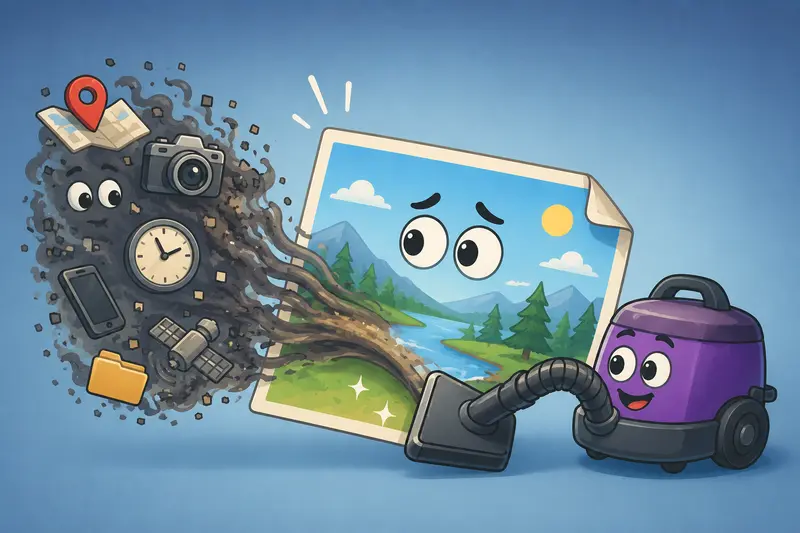
Photos shared between classmates, project groups, or online communities often contain more information than expected. A simple image from a phone can include location coordinates, device details, timestamps, camera settings, and other hidden EXIF data.
That matters more than many students realize.
Whether youre uploading assignment screenshots, sharing portfolio work, posting photography online, or sending scanned study materials, learning how to remove metadata from images is a practical privacy habit especially when files move across public platforms.
One reliable option is Filemazing Metadata Scrubber https://filemazing.com/metadata-scrubber, a browser-based tool designed to clean hidden metadata without requiring desktop software or complicated setup.

What You Should Know First
When you remove metadata from images, the visible picture usually stays the same, but hidden information gets stripped away.
That hidden data may include:
- GPS coordinates
- Device model
- Editing software history
- Camera details
- Creation timestamps
- Embedded author information
For students, this becomes important when sharing files publicly, submitting academic work, or collaborating online.
If you also need smaller upload sizes afterward, you can additionally compress cleaned images for easier sharing https://filemazing.com/compress-image without keeping unnecessary metadata attached.
Why Hidden EXIF Data Can Become a Problem
Most modern phones automatically embed metadata inside every photo.
Sometimes thats useful. Sometimes its awkward.
A classroom whiteboard photo taken at home can unintentionally expose your exact location. Portfolio images may reveal device information. Edited screenshots can carry software traces you never intended to share.
In academic workflows, students commonly exchange:
- lecture screenshots
- scanned homework
- research visuals
- portfolio images
- event photography
- presentation assets
The image itself looks harmless. The metadata may not be.
This is why many users now specifically search for ways to remove metadata before sharing files online.
How the Cleaning Process Works
The overall workflow is straightforward, but there are a few details worth knowing.
1. Upload the image
You can upload JPG, PNG, or other supported image formats directly through the browser.
Cloud import support from services like Google Drive and Dropbox is also available for larger workflows.
2. The metadata gets analyzed
The system checks embedded EXIF and related metadata structures attached to the file.
This may include:
- GPS data
- camera profiles
- editing traces
- timestamps
- author fields
3. Metadata gets stripped
The image content itself remains intact while hidden metadata fields are removed.
This is especially useful before:
- public uploads
- student submissions
- online portfolios
- forum sharing
- social posting
4. Download the cleaned version
After processing finishes, the cleaned image becomes available for download.
Because Filemazing operates with temporary processing workflows rather than long-term storage, uploaded files are automatically cleaned on a short retention schedule.
That privacy-first approach matters when dealing with personal photos or academic materials.
A Practical Test Using Real Student Files
To see how well the workflow held up in realistic conditions, several common student-use scenarios were tested.
Test setup
Files included:
- 18 smartphone JPG photos
- 6 PNG screenshots
- 2 scanned assignment pages exported as images
Total upload size:
- roughly 96 MB
Some files contained:
- GPS coordinates
- iPhone camera data
- editing software tags
- timestamp history
What happened
The metadata scrub completed quickly even during batch processing.
The cleaned files retained their visual quality with no visible image degradation during normal viewing.
One useful observation: screenshots already contained very little EXIF data, while smartphone photos carried extensive location and device information.
That difference catches many users off guard.
Another takeaway was that PNG files behaved differently than JPG images. PNG often stores less traditional EXIF data, but editing tools can still embed hidden metadata blocks depending on the application used.
Where Students Commonly Forget About Metadata
This is one of the easiest privacy mistakes to make.
Students often remove metadata from personal photography but forget about secondary image workflows.
Some overlooked cases include:
PDF exports converted into images
When extracting presentation pages or scanned notes, metadata can remain attached during conversion chains.
If youre converting lecture PDFs first, tools like export PDF pages as images before cleaning metadata https://filemazing.com/pdf-to-image can help simplify the workflow.
Edited screenshots
Certain annotation apps preserve author or software metadata even after editing.
Shared compressed folders
Images packed into ZIP archives still retain original EXIF unless cleaned beforehand.
Social media assumptions
Some platforms strip metadata automatically. Others dont. Relying on the platform to handle privacy is inconsistent at best.
Why Browser-Based Metadata Cleaning Makes Sense
Desktop editing software can remove metadata too, but browser workflows are often more practical for lightweight academic use.
Especially when:
- using school computers
- working across multiple devices
- avoiding software installation restrictions
- processing files quickly before deadlines
Large software suites tend to be excessive for simple metadata scrubbing tasks.
Filemazing keeps the workflow focused:
- upload
- process
- download
- done
The platform also uses transparent token pricing rather than forcing subscriptions. The metadata scrubber itself uses relatively lightweight token consumption compared to heavier processing tasks like video or PDF rendering.
For occasional student workflows, that predictability is easier to manage than recurring software costs.

One Important Tradeoff: JPG vs PNG
Not every image format behaves the same way.
JPG files
- commonly contain large EXIF datasets
- usually benefit most from metadata removal
- ideal for photography and camera images
PNG files
- often contain less EXIF
- may still include software metadata
- preserve sharper graphics and screenshots
In practice:
- JPG is better for smaller file sizes
- PNG is better for preserving crisp text or diagrams
Students handling lecture screenshots often prefer PNG quality, while event photography usually works better in JPG.
Some users clean metadata first and then secure private media files before sending https://filemazing.com/encrypt-file if the files contain sensitive coursework or private content.
Situations Where Metadata Scrubbing Helps Most
The value becomes clearer in real workflows.
Portfolio submissions
Photography or design students often share images publicly without realizing camera details remain attached.
Online class forums
Images uploaded into student communities may expose unnecessary location information.
Research collaboration
Shared diagrams, fieldwork photos, or lab documentation sometimes include embedded timestamps or author metadata.
Freelance student work
Students handling client content should avoid unintentionally leaking editing traces or device identifiers.
Scholarship or application uploads
Personal documents converted into images may carry hidden metadata from scanning tools.
Campus event photography
Large batches of smartphone images frequently include GPS location histories by default.
A Useful Workflow Optimization Tip
If youre cleaning many files regularly, batch processing matters more than most people expect.
Instead of:
- cleaning
- compressing
- encrypting
- uploading
as separate disconnected tasks, it helps to standardize the order.
A more efficient sequence usually looks like this:
- Remove metadata
- Compress images if needed
- Encrypt sensitive files
- Share or archive
Doing compression before metadata cleaning occasionally preserves or regenerates metadata depending on the software involved.
That small sequencing detail can save time later.
Common Questions
Does removing metadata reduce image quality?
Normally no. Metadata removal targets hidden information rather than visible image pixels.
Quality changes usually happen during compression or format conversion, not metadata scrubbing itself.
Can I remove EXIF online without installing software?
Yes. Browser-based tools like Filemazing Metadata Scrubber https://filemazing.com/metadata-scrubber allow users to remove EXIF online directly through a web workflow.
Is metadata removal useful for screenshots too?
Sometimes.
Screenshots typically contain less EXIF data than phone photos, but editing applications can still attach software-related metadata.
What is the best metadata scrubber for students?
The best metadata scrubber depends on workflow needs.
Students usually benefit most from:
- browser access
- fast processing
- temporary file handling
- no installation requirements
- predictable costs
That combination makes lightweight online tools particularly practical.
Are uploaded files stored permanently?
Filemazing uses temporary processing workflows rather than long-term storage systems.
Files are treated as short-term processing artifacts and cleaned automatically after processing.
Can metadata cleaning work with bulk uploads?
Yes. Batch handling is especially useful for large photo sets, project submissions, or shared event galleries.
Large uploads may consume more processing tokens depending on workload size and file characteristics.
Final Thoughts
Learning to remove metadata from images is one of those small habits that becomes increasingly valuable over time.
Students regularly share screenshots, assignments, photos, and project assets across public and semi-public platforms. Hidden metadata often travels with those files unnoticed.
A lightweight browser workflow like Filemazing Metadata Scrubber https://filemazing.com/metadata-scrubber keeps the process practical without requiring heavy desktop software or complicated setup.
And honestly, when deadlines are already stressful, hidden GPS coordinates probably dont need to join the group project too.