Designers rarely have time to wrestle with incompatible audio files. One moment you're preparing assets for a mobile app, the next you're trying to make a background track fit strict format requirements. That’s where a reliable audio format converter online becomes less of a convenience and more of a necessity—especially when deadlines are tight and tools need to stay out of the way.
If your workflow already involves unpacking assets or cleaning files, you might even start earlier by using an archive extraction tool for bundled audio assets before converting anything.
What matters most
An effective audio format converter online should handle files quickly, preserve sound quality, and avoid unnecessary setup. For designers, the goal is simple: convert audio for mobile or web without interrupting creative flow.

Getting it done without friction
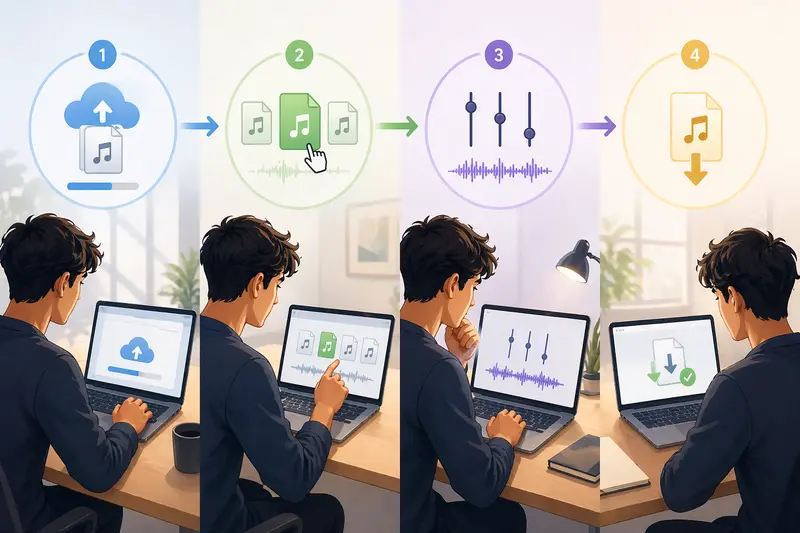
Instead of juggling desktop apps or plugins, here’s a smoother way to approach conversion:
- Upload your audio file (or import from cloud storage)
- Select the target format (MP3, WAV, AAC, etc.)
- Adjust quality settings if needed
- Run the conversion and download the result
That’s it—no installation, no waiting for software updates.
Where Filemazing fits into your workflow
The Filemazing audio converter leans heavily into speed and performance, which makes a noticeable difference when you're processing multiple assets under time pressure. Because it runs entirely in the browser, there’s nothing to install, and tasks are handled through a queued system that doesn’t freeze your workspace.
What stands out is how well it integrates with other file prep steps. For example, after converting audio, you can clean embedded data using a metadata removal tool for audio files —a small but important step before publishing assets publicly.
Behind the scenes, the platform uses a transparent token-based system. You can estimate costs based on file size and duration, which helps avoid surprises when scaling up.
Real-world test: batch conversion under pressure
To see how it performs, imagine this scenario:
- Input: 12 WAV files, each around 8–12 MB, totaling roughly 25 minutes of audio
- Goal: Convert to AAC for mobile app integration
- Process: Uploaded all files at once, applied consistent settings
Outcome:
The conversion finished in a few minutes, with files processed sequentially without blocking the interface. Audio clarity remained intact, and file sizes dropped significantly—ideal for mobile performance.
Takeaway:
Batch processing is where browser-based tools often struggle, but this setup handled it reliably without slowing down.
Tradeoffs designers should actually consider
When converting audio, there’s always a balance:
- Higher quality (WAV, FLAC): Larger files, better fidelity
- Compressed formats (MP3, AAC): Smaller size, slight quality loss
If you're working on UI prototypes or mobile apps, smaller files usually win. But for portfolio pieces or presentations, preserving detail might matter more.
A practical tip:
If you're unsure, export in AAC at a medium bitrate first—it often hits a sweet spot between quality and size for most design use cases.
Common mistakes designers overlook
Even experienced designers slip on these details:
- Converting already compressed files again, degrading quality further
- Ignoring metadata that might expose project details
- Choosing incompatible formats for target platforms
- Overlooking bitrate settings when optimizing for mobile
- Uploading large archives without extracting only needed files first
A smarter approach is to streamline the pipeline—extract only what you need, convert once, and clean the output.
Where this fits in real design workflows
- Preparing sound effects for mobile UI prototypes
- Optimizing background audio for web landing pages
- Converting client-provided files into consistent formats
- Reducing file sizes for faster app loading
- Standardizing audio assets across design systems
- Cleaning and preparing files before portfolio uploads
What you gain from this approach
- Faster turnaround when handling multiple assets
- Consistent output across different formats
- Less reliance on heavy desktop software
- Predictable processing costs with token-based usage
- Better control over file privacy and cleanup
FAQ
Is audio quality preserved during conversion?
Yes, but it depends on your chosen format and bitrate. Lossless formats retain full quality, while compressed ones reduce size with minimal loss.
Can I convert audio online free?
You can start with free daily tokens, then scale usage as needed without committing to subscriptions.
Is it safe to upload audio files?
Files are treated as temporary processing data and automatically removed after a short period, reducing long-term storage risks.
Which formats are supported?
Common formats like MP3, WAV, AAC, and others are typically supported for flexible workflows.
What if I need to process other assets too?
You can handle related files—like converting images—using a format conversion tool for design assets within the same environment.
Final thoughts
When speed matters, your tools shouldn’t slow you down. A well-designed audio format converter online gives you just enough control without adding complexity. Whether you're prepping assets for a mobile interface or refining audio for a presentation, having a fast, browser-based option keeps your workflow moving.
If you're juggling multiple file types and deadlines, it’s worth trying a solution that keeps everything in one place—without locking you into heavyweight software.